# Add the bot to a Planet
Bots join planets the same way users do - through invite links or the Discovery page.
There are two ways to do this. Both are covered below.
## 1. Using my website
The easiest way to add a bot to your Planet is to use my website [here](https://skyjoshua.xyz/planetjoiner).
You should see something like this:
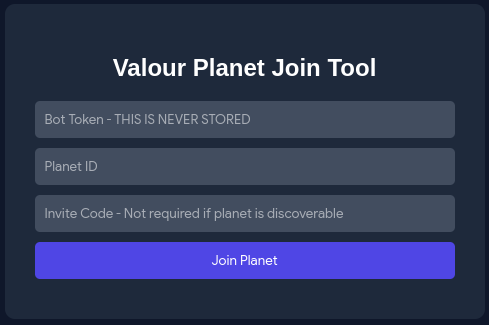
Fill in the boxes with the required information and hit **Join Planet** and the bot should join the desired planet.
*Note: Sometimes the Invite Code is not required if the Planet you are trying to join is Discoverable.*
## 2. Using code
To join a planet from code, call `JoinPlanetAsync` with the planet's ID. If the planet is not open to discovery, you also need to pass an invite code.
```c#
// If the planet is open to discovery only the planet ID is required.
await client.PlanetService.JoinPlanetAsync(planetId);
```
or
```c#
// If the planet requires an invite, pass the invite code as the second argument.
await client.PlanetService.JoinPlanetAsync(planetId, "INVITE_CODE");
```
You can find a planet's ID and invite code from its settings page inside Valour.
### Full code below
```c#
using Valour.Sdk.Client;
using Valour.Shared;
using DotNetEnv;
ValourClient client = new ValourClient("https://api.valour.gg/");
client.SetupHttpClient();
Env.Load();
string token = Environment.GetEnvironmentVariable("TOKEN") ?? string.Empty;
if (string.IsNullOrWhiteSpace(token))
{
Console.WriteLine($"Token invalid. Please make sure you set a valid token in your .env");
return;
}
TaskResult loginResult = await client.InitializeUser(token);
if (!loginResult.Success)
{
Console.WriteLine($"Login failed: {loginResult.Message}");
}
Console.WriteLine($"Logged in as {client.Me.Name} (ID: {client.Me.Id})");
// Join a planet using its ID and invite code
await client.PlanetService.JoinPlanetAsync(00000000000000000, "ABCDEF");
await Task.Delay(Timeout.Infinite);
```
---
## [The Next step is Connecting and Sending a message to a Planet](3.ConnectingAndSending.md)